
Read the diagram as text
The example board limits Doing to three items and Review to two. Review is full, so the team helps finish existing work before pulling another item. Choose real limits from the team’s observations.
Set a boundary→02
Limit WIP→03
Review flow
Begin with a work item that has waited longer than anybody expected. Ask where it is, what it needs next and who can help it move. That conversation is a better starting point than selecting a fashionable number for every column. A useful work-in-progress limit changes a decision: when the system is full, the team helps finish work before admitting more.
Does blocked work count toward a WIP limit?
Work still inside the agreed start-to-finish boundary remains unfinished, even when blocked. Keep it visible and record what is preventing completion. A cap should change the next decision at capacity; it does not make excess items disappear or establish a universal throughput promise. The examples below are fictional working agreements.
What is all thatactive work costing? · Map one piece of work before mapping everything
Choose the boundary before the number
Use the same meaning of “started” and “finished” for your board and measurements. If an item is under review, waiting for testing or blocked by another department, decide explicitly whether it remains inside your system. Moving it to an uncounted parking column would make the board look tidier while leaving the customer's wait unchanged. The Kanban Guide treats work between the defined start and finish as WIP. Your boundary should make that definition useful for the service you deliver.
Write the boundary above the board. For example: “Started means accepted into implementation. Finished means the change is released and the acceptance checks have passed.” This is an illustrative working agreement, not a universal software definition. A support team or design service will need different words.
Run a small, reversible trial
- Observe: record active items and completed items using one consistent unit.
- Agree: select an initial cap that requires a meaningful conversation about starting work. Record why you chose it.
- Respond: decide what happens when the cap is reached: review, pair, test or resolve a dependency.
- Document exceptions: record the reason, owner and expiry for a genuine emergency.
- Review: compare the waiting experience, delivery and quality before changing the policy.
A worked decision, not a performance promise
Imagine a team with twelve active changes. Four are awaiting review and two depend on an external decision. Setting an illustrative cap of ten does not make two items disappear. The first decision is to stop taking ordinary new work and identify a reviewer for the oldest ready change. The team then asks the dependency owner for a decision date. Keep the blocked changes visible; separately label their impediment so people can understand why they are aging.
Do not assume that a lower cap will automatically increase throughput. Work size, skills, demand and interruptions may change at the same time. Our flow calculator holds throughput fixed to illustrate a relationship; it does not forecast an individual team's delivery.
Keep the review honest
Bring the item history to the review, including unfinished and cancelled items. Ask whether people could apply the policy, whether an exception became routine, and whether customers received something useful. If urgent requests displaced planned work, discuss that trade-off openly. Record one policy change at a time where practical, along with the context needed to interpret its effect.
Working agreement to copy
Boundary: accepted for implementation → released and accepted
Initial cap: ____ active items
At capacity: ____ before starting ordinary work
Blocked-item owner and next review: ____
Exception reason / owner / expiry: ____
Review date and evidence to bring: ____
A cap is a guardrail for a conversation. Keep it legible, change it when evidence warrants and avoid treating “full” as the desired state. Read the historical Pull Systems essay for the earlier explanation that informs this experiment.
Primary reference
The Kanban Guide, May 2025 ↗. Consulted 4 October 2026. Procedures and training examples above are editorial proposals; examples are illustrative and are not claimed business results.
Make a full review column change the next decision
A limit is useful when the team knows what to do at capacity. Use the board to make the next decision explicit: finish an existing item, remove an impediment, or document an exception. This editorial exercise extends the guide's working agreement with a fictional review queue and a short exception log.
Count the same boundary every time
In the example, Review starts when a change is ready for a reviewer and ends when the review decision is complete. Waiting and blocked items inside that boundary still count. A cap of two means two unfinished items can be in that part of the workflow. It does not mean two reviewers, two story points or two items per day. Record those other units separately if they help your team.
The May 2025 Kanban Guide calls for explicit control of work in progress and explicit policies for flow. The board, numbers and trial procedure here are our own teaching example. They are not Richard Durnall's reported team results, nor a claim that every review queue should have a cap of two.
Observe the bottleneck, then choose a trial
Imagine that the fictional team has three changes in Review, one blocked on a product decision, and an agreed cap of two. The blocked change remains one of the three. Ordinary new work is held while the team asks which existing change can be completed and who can help. The next action might be pairing on the oldest review, not increasing the cap to make the dashboard green.
Before choosing the initial cap, look at several observations of the actual queue: age of unfinished items, incoming work, available skills and interruptions. Agree a short trial and record its context. Do not infer a precise optimum from one crowded afternoon. The calculator only compares a count with a chosen cap; it does not choose the cap or predict throughput.
An exception needs an end
A genuine urgent defect may require a deliberate exception. Write the reason, the person who accepted the trade-off, the displaced work and a time to review it. For example: “Training incident E-01; urgent defect; owner: on-call lead; review: tomorrow's queue check.” The fictional log is a model for recording a decision, not a recommendation that urgent work always overrides the policy.
If exceptions recur, review the policy and service demand. An emergency label without an expiry can become an uncounted queue. Keep it visible, including the waiting experienced by customers whose work was displaced. A separate lane still needs a clear boundary and a policy.
Review decisions rather than a green counter
Bring the item history, cancellations, defects and exception log to the trial review. Ask whether people could apply the policy and whether useful work finished. Record changes in demand and staffing before attributing an outcome to the cap. The local capacity check includes blocked items in the count and reports an inconsistent input instead of silently removing it.
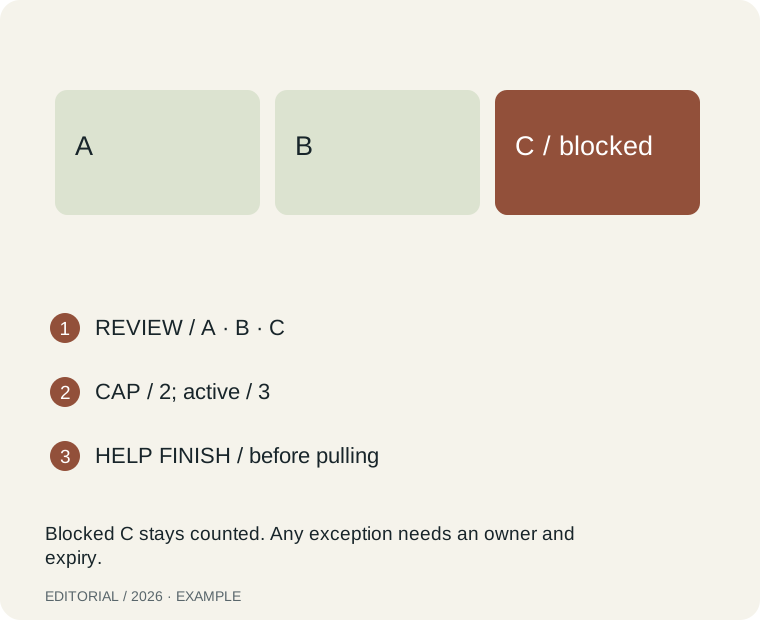
Text equivalent: REVIEW / A · B · C. CAP / 2; active / 3. HELP FINISH / before pulling. Blocked C stays counted. Any exception needs an owner and expiry.
Try the local worksheet
Inputs stay in this page and are not sent or stored. Use anonymised examples. No account is needed.
Download the blank worksheet and worked example ↓
Primary context and limits
Give an urgent WIP exception an exit
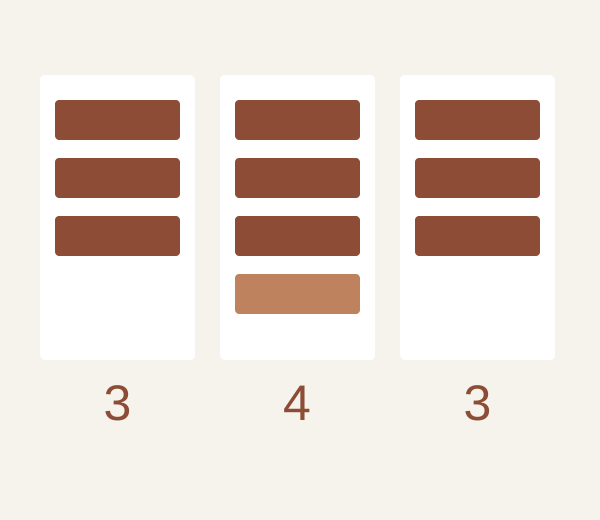
An exception is a deliberate change to the working agreement, not an invisible fourth item. This fictional board record shows the trade-off, owner and expiry that make an urgent exception reviewable. It is new editorial practice, not a reported result from Richard Durnall’s work.
- Define the limit and which items count before discussing urgency. Keep blocked items visible rather than moving them off the board to make room.
- Name the urgent item and why waiting is unacceptable. Record who approves the exception and what planned item will stop receiving attention.
- Set a review time and a closing condition. “Until things calm down” is not an observable exit; completion of the urgent item can be one.
- At review, restore the limit or make a new explicit decision. Record any unfinished work and tell affected recipients what changed.
| Field | Example or check |
|---|---|
| Before | Review column limit 3; three items already present. No unused slot exists. |
| Exception card — fictional | E-04: urgent correction; approved by duty lead. Review count temporarily 4. Item R-12 pauses; its recipient is told. |
| Review appointment | Today at 15:00, duty lead checks E-04. The time is part of the invented example, not a service commitment. |
| Exit condition | When E-04 leaves Review, the count returns to 3. No fifth item enters under this exception. |
| Reusable card | Item __; reason __; original limit __; temporary count __; displaced work __; approval __; review time __; exit __; affected recipient __. |
An exception card does not prove that throughput improved. Evaluate the actual consequences before deciding whether the policy needs a permanent change.
Sources: Durnall — WIP working agreement